
BILL Spend & Expense (Divvy)
Bill.com Inc.Business
4.5555.00 Reviews
- Version
- 4.0.17
- Installs
- 100.00K
- Age Rating
- Everyone
Screenshots
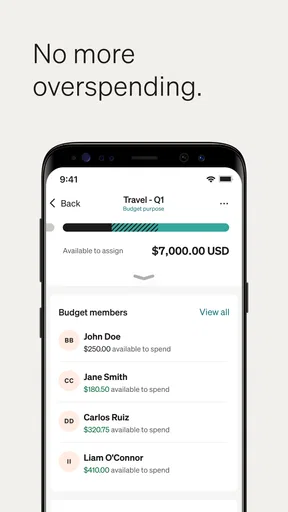
Our Review of BILL Spend & Expense (Divvy)
 Analysis by Appyee
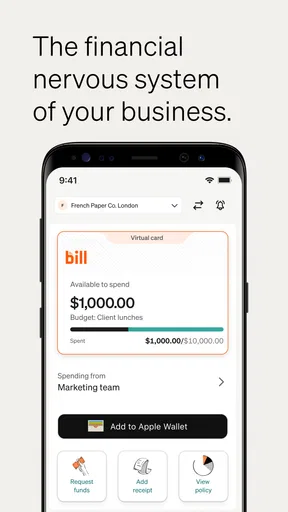
BILL Spend & Expense is a business app for bringing company cards and spending oversight into one mobile workflow. I see the appeal immediately: instead of waiting for a pile of receipts or trying to reconstruct purchases from a bank statement, a team can use one place to keep business spending more visible. The app is developed by Bill.com Inc., and its focus is clearly different from a personal budgeting tool. It is aimed at work expenses, company purchasing, and the people responsible for keeping those purchases organized.
My first impression is that this is most useful when several people spend on behalf of the same organization. A freelancer buying only occasional supplies may find a simpler expense tracker easier, while a growing team can benefit from having corporate-card activity and expense management connected. That distinction matters before installing it: this is not an app I would choose just to monitor household spending or split a restaurant bill with friends.
Getting started without making the first setup harder than it needs to be
The app is free, carries an Everyone content rating, and has been available since August 10, 2017. Its current version is 4.0.17 and it requires operating system version 12 or newer. Those details make the first practical question simple: check the phone before planning a rollout. If the device is compatible, I would install it on the phone used for work and keep the company’s account details nearby rather than trying to improvise the setup between meetings.
I would also decide what role I have before opening the app. An employee who submits purchases, a manager who reviews them, and an administrator responsible for the broader spending process may not arrive with the same expectations. The cleanest first session is one where I know whether I am there to record my own business activity, inspect a company-card transaction, or help manage the process for other people.
That preparation is more valuable than it sounds. Business expense apps can feel confusing when the user expects a blank personal dashboard and instead encounters an organization-based workflow. I would not treat the first screen as a place to explore randomly. I would first look for the area connected to my work role, then make sure the account or organization shown is the one I expect. This avoids the common mistake of entering information into the wrong business context and only noticing later.
The app has passed the early-adopter stage: it shows a 4.5 average from around 4.3 thousand ratings, with more than 100 thousand installs. I take that as a sign that it has a real audience, not as a guarantee that every company will find the workflow perfect. Business tools depend heavily on how an organization handles approvals, cards, receipts, and responsibilities, so the same interface can feel straightforward to one team and restrictive to another.
What I would prepare before opening it
For a smooth first attempt, I would have one genuine work purchase ready, along with its receipt and a clear reason for the purchase. I would avoid beginning with a complicated trip containing many transactions. A small, recent example is better because it lets me learn the sequence from start to finish without mixing several currencies, vendors, or categories into the first test.
I would also ask the person who manages company spending what the organization expects from each transaction. Should every purchase have a receipt? Does a manager need to review it? Is the card activity already visible, or am I expected to record an expense separately? These are operational questions rather than app-store questions, but answering them first prevents me from blaming the app for a company rule I did not understand.
One useful habit is to treat the first session as a controlled trial. I would use a normal business purchase, complete the required details carefully, and then check whether the result is visible where I expect it. That gives me a meaningful success to look for instead of merely confirming that the app opened.
The first useful action is more important than browsing every screen
For me, the first successful action would be taking one real company expense from an unorganized receipt to a clearly recorded business transaction. I would open the expense area, follow the available prompts, attach or capture the receipt if the workflow requests it, and enter only information I can verify. I would not guess at a category or description just to finish quickly. A vague record may save a few seconds now but create extra questions during review.
The best test is an ordinary purchase such as office supplies bought during a workday. I would record what the purchase was for, confirm the amount and date, and then review the completed entry as if I were the manager receiving it. Does the merchant make sense? Is the business purpose understandable? Is the receipt readable? If the answer is yes, I have learned more than I would by opening every menu.
This is where the corporate-card focus becomes useful. When spending activity and expense handling are connected, the person responsible for the books has a better chance of seeing the purchase in context rather than receiving a detached image of a receipt. I would still check the result rather than assuming that a card transaction and a manually entered expense have combined perfectly. Matching the record to the receipt is a small discipline that prevents duplicate entries and unexplained differences.
A practical tip I found valuable is to finish the expense while the purchase is still fresh. Waiting until the end of the week makes it harder to remember why a charge happened, especially when several vendors look similar on a statement. The app can support organization, but it cannot recover a business purpose that I never wrote down.
Another useful workflow is to use a consistent description style. Instead of writing “supplies,” I would write something like “printer paper for client meeting,” provided that is accurate. This makes the record easier for another person to understand and reduces back-and-forth. It is a small improvement, but it turns the app from a storage drawer into a clearer handoff between employee and reviewer.
Where new users may hesitate
The biggest source of confusion is the difference between a corporate-card transaction and an expense report created by a person. They may be related, but they are not automatically the same thing in the user’s mind. If I see a charge already associated with company spending, I would first inspect that item before creating another entry. Duplicating it can make the records harder to reconcile and may give a reviewer two versions of one purchase.
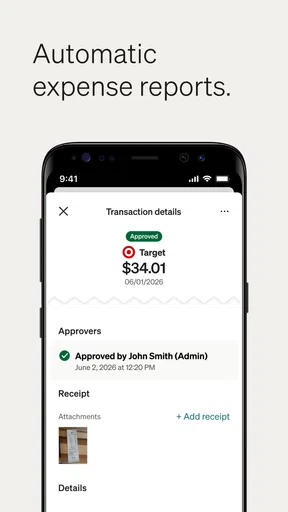
Receipts can create a second kind of uncertainty. A receipt image is not the same as a complete explanation. I would check that the image is legible and that the written details agree with the transaction. If a receipt is missing or unclear, I would follow the company’s procedure rather than inventing a replacement description. The app can organize what I submit, but the quality of the final record still depends on what I provide.
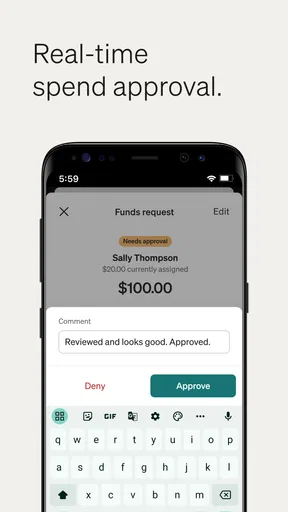
Approval is another area where expectations need to be realistic. Seeing an expense in the app does not necessarily mean that it has been approved, reimbursed, or fully processed. I would look for the item’s current state and learn what that state means inside my organization. A first-time user should not assume that saving a transaction completes every later step.
I would also avoid treating the mobile app as a complete replacement for every business-finance task. It is convenient for capturing information close to the purchase and checking spending while away from a desk. More involved review, policy decisions, or accounting work may still be better handled through the organization’s broader process. The phone is strongest when it removes delay from the front end, not when it is forced to become the entire finance department.
How it compares with familiar alternatives
The usual alternative is a spreadsheet, email, or a shared folder full of receipt images. Those methods can work for a very small team, but they depend on people remembering several separate steps. A spreadsheet may show an amount while the receipt sits elsewhere; email may preserve an attachment while making status and ownership difficult to follow. BILL Spend & Expense is more appealing when the company wants card spending and expense handling to live in a dedicated business environment rather than in a collection of improvised files.
Compared with a personal finance app, this tool is better suited to work purchases and organizational accountability. A personal budgeting app usually asks, “How is my money being spent?” Here, the more useful question is, “How should this company purchase be recorded, understood, and handled?” That makes it a poor fit for household budgeting, but a more natural fit for employees who use company cards or submit business expenses.
Compared with a basic receipt scanner, the advantage is context. Scanning an image alone does not solve the question of who made the purchase, why it happened, or how it relates to company spending. The trade-off is that a business-focused app can require more attention to roles and process than a simple scanner. If all I need is a personal archive of receipts, the extra structure may feel unnecessary.
I would choose a spreadsheet over this app for a tiny operation where one person makes nearly every purchase and already keeps excellent records. I would choose a dedicated business workflow like this when multiple employees spend money, managers need visibility, or receipts regularly arrive after the purchase. The right choice depends less on the number of features and more on how often the current method loses information.
Small workflow decisions that make a noticeable difference
My first recommendation is to use a low-risk transaction as the learning exercise. Do not begin with a large purchase, a complicated travel claim, or an expense that is already disputed. A simple office purchase reveals the basic path while keeping the consequences of a mistake small. Once that works, I would move to a more complicated example.
Second, I would review the record immediately after saving it. This catches the most common human errors: a missing receipt, an unclear description, or a mistaken amount. The review takes less time when the purchase is still in front of me, and it gives the manager a cleaner record later.
Third, I would separate “captured” from “finished” in my own routine. Capturing the expense means the information is in the system. Finishing means I have checked the details and understood what happens next. That distinction is especially important for first-time users who may see a saved item and assume that no further attention is needed.
Fourth, I would agree on a team habit for descriptions before many people start using the app. A short shared convention, such as naming the project or business purpose consistently, can make searches and reviews much easier. This is not a flashy feature, but it is one of the ways a company gets more value from organized expense data.
Finally, I would test the workflow from both sides when possible. After submitting one expense, I would ask the reviewer to confirm what they can see and what action they expect next. That quick check exposes gaps that are invisible from the employee’s phone. It also prevents the organization from assuming that installation alone has created a working process.
Who will appreciate it, and who should skip it
I think the app is a strong candidate for small and medium-sized teams that want a clearer connection between corporate-card activity and employee expenses. It can also suit people who travel for work, purchase materials on behalf of a company, or regularly need to explain business spending to someone else. The mobile format is particularly useful for recording an expense close to the moment it happens instead of rebuilding the details later.
I would be more cautious if the team rarely uses corporate cards, has only one occasional expense, or already has a reliable accounting routine that everyone follows. In those cases, introducing another workflow may create more training than value. I would also skip it for personal budgeting, household bills, or casual expense splitting, because those jobs do not match the app’s business purpose.
People who dislike structured expense processes may find it demanding, even though that structure is part of its usefulness. The app cannot make an organization’s approval rules disappear. It can make the information easier to handle, but employees still need to provide accurate details and reviewers still need to make decisions.
My recommendation after testing the complete path
BILL Spend & Expense makes the most sense when a company wants spending records to be created closer to the purchase and kept in a business-specific workflow. I like the emphasis on corporate cards and expense management because it addresses a real problem: receipts, transactions, and explanations often become disconnected when teams rely on email or spreadsheets.
My reservation is not about the basic idea; it is about fit. A first-time user needs to understand their role, distinguish card activity from a separate expense entry, and learn what happens after saving a record. Those are manageable hurdles, but they should be handled deliberately. The app is not a magic replacement for clear company procedures.
With an operating system version of 12 or newer, the app is free to install and available to an Everyone-rated audience. The developer is Bill.com Inc., and the product has built a substantial user base, with more than 100 thousand installs and around 555 written reviews. I would use those figures as reassurance that the app is established enough to evaluate, while still testing it against my team’s actual process.
My practical advice is to install it, prepare one ordinary work purchase, and aim for a complete record rather than a tour of the interface. If that transaction becomes easy to capture, understand, and review, the app is probably addressing a genuine weakness in the company’s current method. If the team only needs a personal receipt folder or a simple spreadsheet, I would choose the lighter option instead. For organizations managing shared business spending, however, BILL Spend & Expense is worth serious consideration because its value appears in the handoff between the person who spends and the person who needs to understand that spending.
Verdict
Strengths of BILL Spend & Expense (Divvy)
- Automates receipt capture and matches expenses to transactions.
- Real-time spending visibility helps teams monitor budgets more closely.
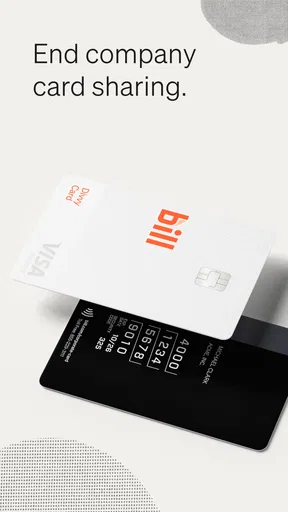
- Virtual cards can be issued quickly for controlled business purchases.
- Approval workflows reduce manual follow-up between employees and managers.
- Integrates with accounting tools to simplify expense reconciliation.
Limitations of BILL Spend & Expense (Divvy)
- Some advanced controls may require a higher-tier business subscription.
- Employees may need training to follow card and receipt policies correctly.
- Mobile features depend on reliable internet access while traveling.
- Frequent notifications can become distracting for active card users.
- Best suited to businesses; it may be excessive for very small teams.
Other Releases by Bill.com Inc.
View All
BILL AP & AR Business Payments
Business4.3
Similar Picks in This Category
View All
LinkedIn: Community & Network
LinkedIn3.8

Zoom Workplace
zoom.com4.1

Microsoft Teams
Microsoft Corporation4.6

Meta Business Suite
Meta Platforms, Inc.4.6

Webex Meetings
Cisco Systems, Inc.4.5

TeamViewer Remote Control
TeamViewer4.4
Frequently Asked Questions
What is BILL Spend & Expense (Divvy), and who is it designed for?
BILL Spend & Expense, formerly known as Divvy, is a business spending and expense-management platform designed for companies, finance teams, and employees. It combines corporate cards, budgets, expense tracking, receipt collection, approvals, and reporting in one system. It is generally intended for organizations rather than personal budgeting, and access to its features may depend on an employer’s account, plan, and administrator settings.
Can employees use the app to manage company purchases and expenses?
Yes. Employees can typically use BILL Spend & Expense to view available spending limits, make approved business purchases, upload receipts, add notes, and submit expenses for review. Depending on company policies, the app may also show assigned budgets and spending categories. However, employees usually need an invitation or login provided by their organization, and some actions may be restricted by approval rules configured by an administrator.
Does BILL Spend & Expense support receipt scanning and expense reporting?
The platform is built to simplify expense reporting by allowing users to capture or upload receipts and connect them with transactions. Receipt information may be entered manually or processed using available scanning and automation features, depending on the device and account configuration. Users should still review extracted details carefully, since image quality, merchant formatting, taxes, and other information can affect how accurately a receipt is categorized.
Is BILL Spend & Expense secure for handling business spending information?
BILL Spend & Expense includes business-focused controls such as user permissions, spending limits, transaction monitoring, approval workflows, and administrative visibility. These tools can help companies control how funds are used and identify unusual activity. Nevertheless, no financial application is completely risk-free. Users should protect their login credentials, enable available security options, avoid sharing account access, and contact their company administrator promptly if a card or transaction appears suspicious.
Is BILL Spend & Expense free to download and use?
The app may be free to download from the relevant app store, but downloading it does not necessarily mean that all services are free. BILL Spend & Expense is primarily connected to business plans, corporate accounts, and agreements managed by an employer or organization. Pricing, card availability, transaction features, and administrative tools can vary, so companies should review BILL’s current terms and pricing before adopting the platform.
